Stop working on the 'dumb zone'
There’s this concept in “context engineering” where the model’s performance starts collapsing after the context is filled above 40-50%. This is colloquially called the “dumb zone,” and it’s recommended to avoid it to keep the model behaving correctly and sticking to the plan.
However, in Claude Code, the context isn’t visible until the dreaded “auto-compact” window is about to be reached—generally around 80%. In recent releases (2.0.67, I believe), context usage has been made available for the Status Line script, so we can now track our context usage and whether we’re stepping into the “dumb zone,” then clean or summarize when appropriate.
To set this up, just ask Claude to:
Add context to the status line, showing a progress bar that is green from 0 to 40%, then yellow up to 80%, then red.
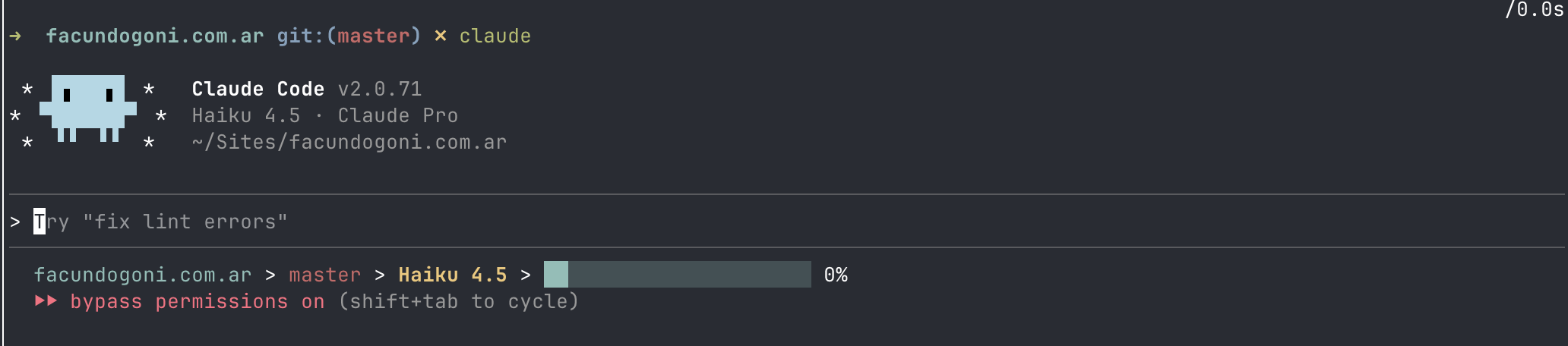
It will invoke the statusline-setup sub-agent and configure the script to show the context progress bar. You can also display the directory, current git branch, and current model to get a high-level view of your session.
There’s plenty more to do with the status line, and I’m looking forward to discovering other clever uses for it!